
Keep the context together
Useful form information joins the contact record and history, ready for the next conversation.
An enquiry should not get lost between emails. We connect your website to your team’s follow-up: contact details, context, next action and the person responsible.
Gatineau · Outaouais · Canada & France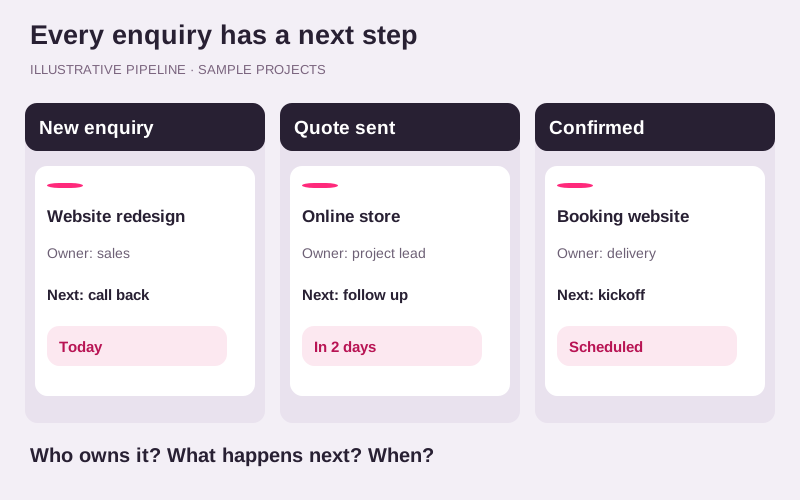
Useful form information joins the contact record and history, ready for the next conversation.
To contact, appointment, estimate: stages are based on the way your team works.
Confirmation, notification or reminder: each automation needs a clear trigger and purpose.
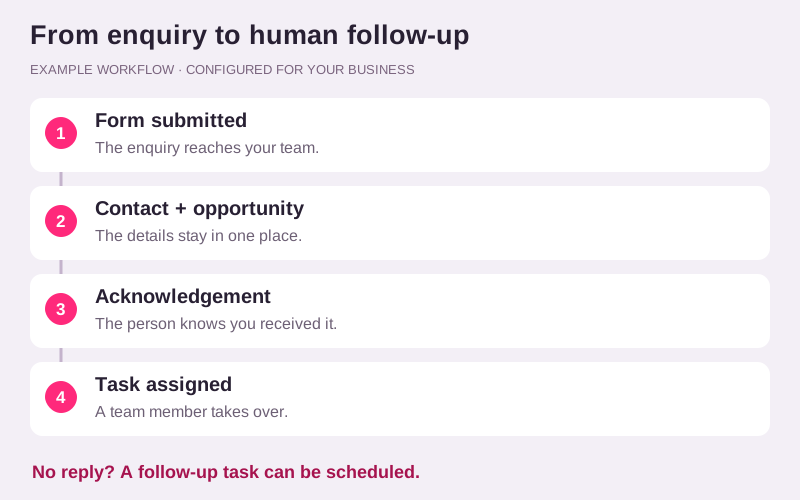
A form can trigger a contact and opportunity, an acknowledgement and a task for the right person. We define the triggers, timing and messages with you before enabling the workflow. This diagram shows an example to adapt to your team.
Bring your questions. These decisions shape the work and the budget.
Forms can collect the service requested, coverage area, project type and necessary contact details. Questions should remain proportionate so the first step stays simple. The goal is to prepare a conversation, not replace human qualification.
A CRM helps organize contacts and opportunity stages. We define a process with your team, from a new enquiry to a conversation, proposal and next action. Fields, owners and tasks should reflect how you work.
Depending on your plan and available integrations, acknowledgements, notifications or reminders can be triggered. Email and SMS require suitable setup and authorized contacts. Sending limits, usage costs and stop conditions are defined before activation.
Each automation should have a clear trigger, message, recipient, delay and stop rule. Workflows are tested before activation so your team can follow enquiries and recognize when a personal response is needed.
No. We first review your tools and available integrations. Connecting them may be preferable to replacement.
No. Terms and charges depend on the plan, channel and usage, and should be specified in your proposal.
Yes. A dedicated service supports honest feedback requests and reminders without selecting recipients by satisfaction.
A current site, an idea or a problem to solve: that is enough to start the conversation.